Fine-grained brightness control for low-light Android use
Dim your display below the system minimum with Sub-zero, train the auto-brightness with manual calibrations, and apply Night or Astronomer filters for low-light viewing. Lux Lite, by V C, is an Android utility that replaces the stock auto-brightness manager, offers camera-based ambient readings when the light sensor is unreliable, and targets night readers and power users who want precise display control and low app footprint.
What does the tool actually change about auto-brightness?
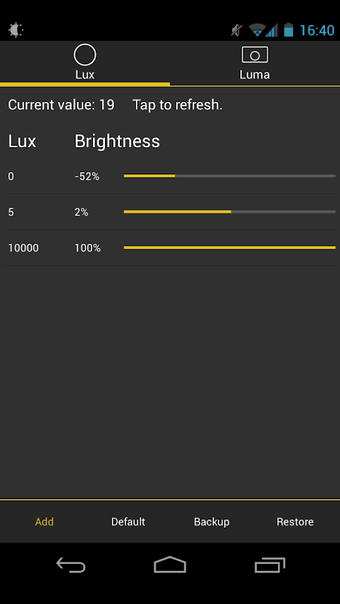
Lux replaces the device's stock auto-brightness with an adaptive manager that learns from manual slider adjustments, and it exposes modes such as Night and Astronomer for different viewing aims. The app's Sub-zero feature lowers the screen below the system minimum, and manual calibration uses a link button to remember preferences for specific ambient light levels, so the app applies your saved setting when similar light is detected.
Does it affect system performance during continuous operation?
The app maintains a very small footprint, reported at about 2.5MB, which keeps CPU and memory impact low while running. It can use the camera to measure ambient light when the hardware sensor is inaccurate, and that choice may increase sensor or camera activity only when selected. Historical compatibility begins at older Android versions, so the service runs across a wide set of devices without heavy background resource use.
Is it safe to use and does it require technical setup?
Lux operates as an overlay-style brightness manager, so newer Android releases may require explicit permission handling for screen overlays. The developer provides a learning calibration workflow that nontechnical users can follow: adjust the slider, tap the link button, and the app stores the mapping. The app's Astronomer mode applies a red filter to preserve night vision, and jitter control reduces frequent tiny brightness changes without system registry writes.
Recommendation and one practical caveat
Lux is a sensible option for readers and power users who need very low display brightness and tailored ambient responses. It suits anyone who values small app size and an adjustable auto-brightness algorithm. Allowing overlay permissions on current desktop-class Android builds may require extra steps, so set those permissions before relying on automatic adjustments at night.